

Latest Version
January 02, 2025
Artisan Series
Windows
4
Report a Problem
More About Epson Artisan 600 Adjustment Program
Epson Artisan 600 Adjustment Program: A Complete Guide
The Epson Artisan 600 is a versatile all-in-one inkjet printer, designed to meet the needs of both home and small office environments. Known for its high-quality prints, efficient scanning capabilities, and user-friendly features, it is a popular choice for many. However, like all printers, the Epson Artisan 600 requires maintenance and occasional adjustments to keep it operating at its peak performance. This is where the Epson Artisan 600 Adjustment Program comes into play.
What is the Epson Artisan 600 Adjustment Program?
The Epson Artisan 600 Adjustment Program is a diagnostic and maintenance tool designed to help users troubleshoot and resolve common issues that may arise with their printer. It allows for various adjustment functions to be carried out, including resetting the printer's internal counters, cleaning print heads, adjusting ink levels, and more. The program is typically used when standard troubleshooting steps, such as cleaning the print head or recalibrating the printer, do not resolve issues.
This program is often used by technicians and advanced users to fix problems that go beyond the usual repair steps provided in the printer's manual. It is particularly helpful for issues related to ink wastage, print head problems, or ink pad overflow errors.
Features and Functions of the Epson Artisan 600 Adjustment Program
The Epson Artisan 600 Adjustment Program offers a wide range of features that make it a comprehensive solution for printer maintenance. Some of the key functions include:
Resetting the Ink Waste Pad Counter: Over time, the printer’s ink waste pad, which absorbs excess ink during printing, can become saturated. The program allows you to reset the ink waste pad counter, so your printer doesn’t display an error related to this.
Print Head Cleaning and Alignment: The program can initiate deep cleaning cycles to remove clogs in the print head, ensuring your prints remain crisp and clear. It also enables head alignment adjustments to ensure accurate color reproduction and optimal print quality.
Resetting the Printer’s Internal Counters: The program resets the internal counters that track the printer’s usage, such as ink levels and page count. This can help resolve issues such as ink level misreadings or erroneous warnings about ink usage.
Clearing Error Messages: When your printer experiences certain errors (e.g., ink waste pad overflow), the Epson Artisan 600 Adjustment Program can help clear these error messages and reset the system to normal operation.
Cleaning the Ink System: The program runs the cleaning process to remove dried ink from the print head and maintain a smooth flow of ink during printing.
How to Download and Use the Epson Artisan 600 Adjustment Program
While the Epson Artisan 600 Adjustment Program is not officially available from Epson’s website, you can find third-party sources that offer it for download. However, be cautious when downloading from unofficial sites, as they may contain malicious software.
Here is a general outline of how to use the program:
Download the Program: Search for a reputable website that offers the Epson Artisan 600 Adjustment Program. Make sure to download it from a trustworthy source to avoid downloading malware.
Install the Software: Once downloaded, run the installer and follow the on-screen instructions to complete the installation process.
Connect the Printer: Ensure that your Epson Artisan 600 is connected to your computer via USB or network.
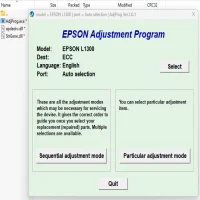
Run the Program: Open the Adjustment Program and select the appropriate model (Epson Artisan 600). You will be presented with a list of options for printer adjustments.
Perform the Desired Adjustments: Depending on the issue you are trying to resolve, select the corresponding adjustment function (e.g., ink waste pad reset, print head cleaning, etc.) and follow the on-screen instructions.
Finish and Restart the Printer: After completing the adjustments, restart your printer to ensure that the changes take effect.
Precautions When Using the Adjustment Program
While the Epson Artisan 600 Adjustment Program is a powerful tool, there are a few important precautions to consider:
Backup Important Data: Before running any adjustments, make sure to back up any important documents or data stored in your printer’s memory.
Use the Program Sparingly: The program is designed for advanced users and technicians. Frequent use of some functions, such as deep cleaning, can cause excessive ink wastage. Only use the program when necessary.
Follow Instructions Carefully: Always follow the instructions provided within the program to avoid causing harm to your printer. If in doubt, consult a professional technician.
Third-Party Software Risks: Since the Adjustment Program is not officially provided by Epson, there is always a risk when using third-party software. Ensure you are downloading from a reputable source to avoid issues with your computer or printer.
Conclusion
The Epson Artisan 600 Adjustment Program is a useful tool for managing the maintenance and performance of your printer. It can help address common issues like ink waste pad overflows, print head clogs, and error messages that traditional troubleshooting steps may not resolve. While it is an advanced tool, it can be a game-changer for users looking to extend the life of their printer and keep it functioning smoothly.
As with any software, it’s essential to be cautious and follow the instructions carefully to avoid potential problems. With the right precautions and responsible usage, the Epson Artisan 600 Adjustment Program can be an invaluable tool in maintaining your printer’s performance and longevity.
Rate the App
User Reviews


Popular Apps