
Latest Version
Download NowMore About Epson Stylus CX9400Fax Adjustment Program
Epson Stylus CX9400Fax Adjustment Program: Unlocking Printer Potential
The Epson Stylus CX9400Fax is a versatile printer that combines printing, scanning, copying, and faxing into one compact unit. While it boasts impressive functionality, there are moments when users face challenges requiring fine-tuning and recalibration. This is where the Epson Stylus CX9400Fax Adjustment Program comes into play—a specialized tool designed to maintain, troubleshoot, and enhance printer performance.
What Is the Adjustment Program?
The adjustment program is a diagnostic utility developed by Epson for their printers. Its primary purpose is to provide advanced users and technicians with access to critical maintenance tasks and system settings not available through the standard printer software.
For the CX9400Fax, this program allows you to resolve issues such as:
- Resetting Waste Ink Pad Counters: A common problem with Epson printers is the "service required" error caused by a full waste ink pad counter. The adjustment program resets this counter, restoring functionality without hardware replacement.
- Head Alignment and Calibration: Fix misaligned print heads that cause blurry or streaky output.
- EEPROM Reset: Restore factory settings to correct persistent errors.
- Ink Charge Management: Optimize ink flow to ensure consistent printing quality.
- Testing and Diagnosis: Run component tests to identify faults in the printer's mechanical or electronic systems.
How to Use the Adjustment Program
Before using the adjustment program, it's essential to follow these steps carefully to avoid damaging your printer or voiding your warranty:
- Download the Correct Tool: The adjustment program for the Epson Stylus CX9400Fax can typically be obtained from authorized Epson service centers or third-party providers. Be cautious about downloading from unverified sources to avoid malware.
- Install and Prepare: Ensure the program is installed on a Windows PC, as it’s usually compatible only with this operating system. Connect your printer via USB.
- Run the Program in Administrator Mode: Launch the software as an administrator to ensure all features work correctly.
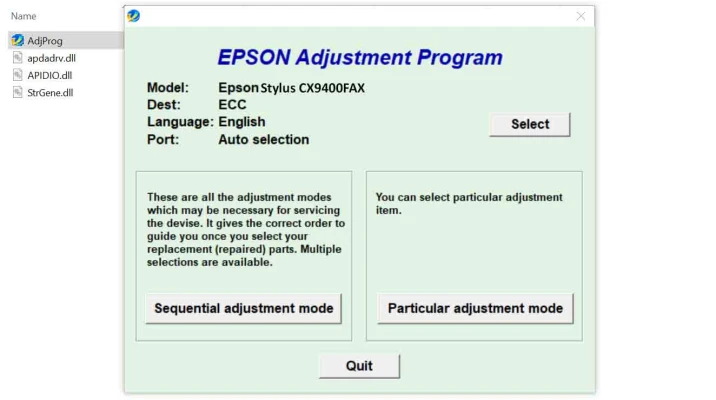
- Choose Your Model: Select the Epson CX9400Fax from the program's menu.
- Execute Desired Functions: Follow the on-screen prompts for the specific adjustment you wish to perform, whether resetting counters or calibrating print heads.
Key Benefits of the Adjustment Program
- Cost Savings: Avoid expensive repairs by fixing issues like waste ink pad errors at home.
- Extended Printer Lifespan: Regular maintenance using the program ensures your printer remains in optimal condition for years.
- Enhanced Print Quality: Calibrating and aligning the printer regularly eliminates streaks and uneven colors.
Things to Keep in Mind
While the adjustment program is a powerful tool, it requires a degree of technical knowledge. Misusing it can result in further damage or voided warranties. Always consult the user manual and seek professional assistance if you're unsure about performing specific tasks.
Alternatives to the Adjustment Program
If accessing the adjustment program seems daunting, consider these alternatives:
- Epson Support Services: Contact Epson's customer service for authorized maintenance.
- Third-Party Repair Shops: Many independent repair centers specialize in handling Epson printers.
- Manual Maintenance: Perform basic upkeep like cleaning the print heads and replacing ink cartridges.
Conclusion
The Epson Stylus CX9400Fax Adjustment Program is an invaluable tool for those looking to maximize their printer's efficiency and longevity. While it requires some technical expertise, its benefits far outweigh the learning curve, providing users with the power to troubleshoot and fine-tune their devices independently. With this program, your CX9400Fax can deliver peak performance for all your printing needs.
Would you like further customization or more technical details?
Rate the App
User Reviews


Popular Apps