
Latest Version
Download NowMore About Epson Stylus C50 Adjustment Program
Epson Stylus C50 Adjustment Program: A Complete Guide
The Epson Stylus C50 is a popular inkjet printer known for its reliability and quality prints. However, over time, as with any printer, issues can arise such as clogged printheads, incorrect print alignment, or errors in the printer’s internal systems. To resolve such issues, users may need to perform certain adjustments. This is where the Epson Stylus C50 Adjustment Program comes into play.
The Epson Stylus C50 Adjustment Program is a tool designed to troubleshoot and repair various common problems in the printer. This program allows users to reset the printer's internal counters, fix problems with the ink waste pad, and perform printhead alignment, among other useful functions. In this guide, we will take a look at the features of the Epson Stylus C50 Adjustment Program and how to use it effectively.
What is the Epson Stylus C50 Adjustment Program?
The Epson Stylus C50 Adjustment Program is a diagnostic and repair tool that can be used to fix a variety of printer problems. It is typically used by technicians or advanced users who have experience with printer maintenance. The program is capable of performing several functions, including:
-
Resetting the Ink Waste Counter: If the ink waste pad inside the printer becomes full, it can trigger a warning or stop the printer from functioning properly. The Adjustment Program allows you to reset this counter and continue using the printer.
-
Printhead Alignment: Misalignment of the printheads can result in poor print quality, including blurry or streaked prints. The program can help realign the printhead to restore optimal performance.
-
Cleaning Printheads: If ink has dried up or clogged the printhead nozzles, the program can be used to perform a cleaning cycle to restore proper ink flow.
-
Firmware and Software Updates: The program can sometimes be used to install firmware or software updates, ensuring that the printer is running the latest version.
How to Use the Epson Stylus C50 Adjustment Program
Before starting with the Adjustment Program, it’s important to ensure that the Epson Stylus C50 printer is correctly connected to your computer and powered on. Here's a step-by-step guide on how to use the program:
-
Download and Install the Program: The Epson Stylus C50 Adjustment Program is not available through Epson’s official website, so users often need to download it from third-party sources. Make sure you are downloading from a reliable site to avoid malware. Once downloaded, run the installer and follow the on-screen instructions.
-
Connect Your Printer: Ensure your Epson Stylus C50 is connected to your computer via USB or a network connection. The program will not work if the printer is not properly connected.
-
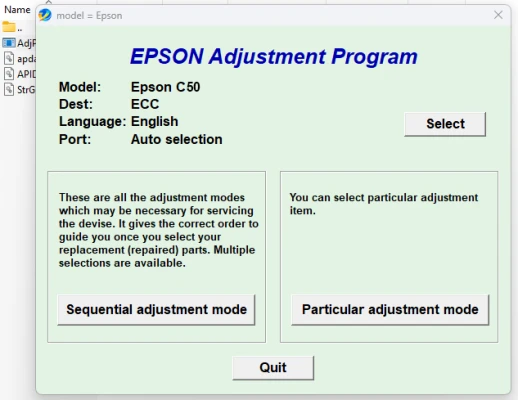
Run the Adjustment Program: After installation, open the Adjustment Program. It may require you to enter a password (often found in the program’s documentation) to access the full features.
-
Select the Desired Function: The program will present a list of functions such as “Waste Ink Pad Reset,” “Printhead Alignment,” and “Cleaning.” Select the option that addresses your printer's issue.
-
Follow the On-Screen Instructions: Once you select a function, follow the on-screen instructions to complete the task. For example, if you're resetting the ink waste counter, you will be prompted to confirm the reset.
-
Test the Printer: After completing the necessary adjustments, run a test print to ensure that the issue has been resolved.
Common Issues Fixed by the Epson Stylus C50 Adjustment Program
-
Ink Waste Pad Overflow: Over time, printers accumulate excess ink, which is absorbed by a waste ink pad. If the pad is too full, the printer may stop functioning. The Adjustment Program can reset this counter, allowing the printer to resume normal operation.
-
Print Quality Problems: Misalignment, smudges, or gaps in printed text and images can often be resolved through the Adjustment Program’s printhead alignment and cleaning functions.
-
Error Codes: The program can help fix specific error codes that may occur during normal operation.
-
Paper Feed Issues: Sometimes, paper may get stuck or fail to feed correctly due to misalignment or a mechanical issue. The program may help in some cases, though more physical troubleshooting may be required.
Precautions When Using the Epson Stylus C50 Adjustment Program
While the Adjustment Program can be a powerful tool for fixing printer issues, there are some important precautions to take:
-
Backup Important Data: The program may reset certain settings, so ensure any important printer configurations are backed up if needed.
-
Use Reliable Software Sources: Only download the Epson Stylus C50 Adjustment Program from trusted websites to avoid downloading malicious software that could harm your computer.
-
Understand the Risks: Some of the adjustments made by the program may affect the printer’s warranty or void it. Always consider these risks before using the program, especially if your printer is still under warranty.
-
Seek Professional Help If Needed: If you're unsure about performing these adjustments yourself, it's advisable to contact a professional technician who is experienced in handling Epson printers.
Conclusion
The Epson Stylus C50 Adjustment Program is a useful tool that can help you extend the life of your printer and ensure it continues to perform at its best. Whether you’re resetting the ink waste counter, cleaning the printheads, or solving print quality issues, this program can save you time and money by allowing you to handle basic maintenance tasks yourself. Just be sure to follow the instructions carefully and exercise caution when using third-party software.
Rate the App
User Reviews


Popular Apps