
Latest Version
Download NowMore About Epson L3110 Adjustment Program
Epson L3110 Adjustment Program: A Comprehensive Guide
The Epson L3110 is a versatile and popular inkjet printer known for its cost-effective printing and high-quality results. However, like any printer, it may face issues related to its functionality over time, such as print quality problems, ink waste, or counter errors. To resolve these, the Epson L3110 Adjustment Program comes in handy.
In this article, we'll explore what the Epson L3110 Adjustment Program is, why it is essential, and how to use it to restore your printer's functionality.
What is the Epson L3110 Adjustment Program?
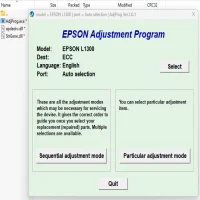
The Epson L3110 Adjustment Program is a software tool designed to help users perform maintenance tasks on their Epson L3110 printer. This program allows you to reset various internal counters, clear error messages, and adjust settings related to ink levels and print heads. It’s often used when the printer displays an error like "Service Required" or when the printer begins to malfunction due to waste ink accumulation.
This software is primarily meant for technicians and advanced users, as it allows deeper access to the printer’s firmware and system functions. It can help in situations where other troubleshooting methods, like cleaning the print heads or updating drivers, do not work.
Why Do You Need the Epson L3110 Adjustment Program?
There are several reasons you might need the Epson L3110 Adjustment Program:
-
Ink Waste: Over time, ink waste can accumulate in the printer’s waste ink pad, leading to an error message. The Adjustment Program allows you to reset the waste ink counter and clear the warning, preventing further disruption.
-
Print Head Alignment and Cleaning: The program provides tools to adjust print head alignment and perform deep cleaning operations. This can help solve problems like faded prints, streaking, or ink smudging.
-
Resetting Printer Counters: The Epson L3110 tracks the number of printed pages and other performance metrics. If the printer reaches a threshold for certain internal counters, the Adjustment Program allows you to reset these counters to avoid error messages.
-
Solving Printer Errors: If you encounter an error code like "Service Required" or "Ink Absorber Full," the program can be used to reset these errors and make the printer functional again.
How to Use the Epson L3110 Adjustment Program
Before using the Adjustment Program, ensure that you understand the risks involved. It’s always recommended to back up any important data and follow the instructions carefully to avoid damaging the printer.
Here’s a step-by-step guide on how to use the Epson L3110 Adjustment Program:
-
Download the Software: Search for the Epson L3110 Adjustment Program online, ensuring that you download it from a reputable source. Avoid downloading it from untrusted websites to protect your computer and printer from malicious software.
-
Install the Program: Once downloaded, extract the files and run the installer to set up the program on your computer.
-
Connect the Printer: Ensure your Epson L3110 is connected to the computer via USB or Wi-Fi, depending on your printer’s connection type.
-
Run the Program: Open the Epson L3110 Adjustment Program and select the appropriate options for your issue. You’ll likely need to choose the printer model from a list within the program.
-
Select the Reset Option: If you're dealing with an error like “Ink Absorber Full,” choose the reset function that corresponds to your issue. The program will walk you through the necessary steps.
-
Follow On-Screen Instructions: The program will guide you through a series of steps to reset the printer’s internal counters or perform maintenance tasks. Follow the instructions carefully and allow the program to complete the process.
-
Test the Printer: After completing the reset or adjustment, print a test page to ensure everything is functioning correctly. If you were dealing with print quality issues, the printer should now perform optimally.
Risks and Precautions
While the Epson L3110 Adjustment Program can be incredibly helpful, there are some risks involved:
-
Incorrect Use: Improperly using the Adjustment Program can result in permanent damage to your printer. Always read the instructions and follow them carefully.
-
Warranties: If your printer is still under warranty, using this program might void the warranty. It’s important to check your warranty terms before proceeding.
-
Data Loss: The program modifies printer settings, so any custom settings you’ve made (like print quality preferences) may be reset to defaults.
Conclusion
The Epson L3110 Adjustment Program is a valuable tool for maintaining and troubleshooting your printer. Whether you're dealing with an error, ink waste, or print quality issues, this program can help restore your printer’s performance. However, always exercise caution and ensure that you follow the correct procedure to avoid damaging your device.
If you're unsure about using the program or don’t want to risk voiding your warranty, it’s best to consult a professional technician who can handle the adjustments for you.
Rate the App
User Reviews


Popular Apps