Latest Version
More About Epson Expression ME-301 Adjustment Program
Epson Expression ME-301 Adjustment Program: A Comprehensive Guide
The Epson Expression ME-301 is a popular inkjet printer, offering high-quality printing with ease of use for both home and office environments. Over time, like any other printer, the Epson ME-301 may encounter certain issues related to its ink cartridges, print heads, or other internal components. When this happens, the Epson Expression ME-301 Adjustment Program can be a valuable tool to restore the printer to optimal performance. In this article, we will explore the Epson Expression ME-301 Adjustment Program, its purpose, and how it can be used to troubleshoot and fix common printer problems.
What is the Epson Expression ME-301 Adjustment Program?
The Epson Expression ME-301 Adjustment Program is a software utility designed to diagnose and resolve problems with the Epson ME-301 printer. This program is typically used by technicians and advanced users to perform maintenance tasks that are not accessible through the printer's standard control panel.
It allows users to reset various settings, clean print heads, calibrate the printer, and fix issues like ink wastage, incorrect printouts, or error messages related to the printer's components. The program communicates with the printer's firmware to make adjustments that restore functionality and improve print quality.
Key Features of the Adjustment Program
-
Resetting the Ink Counter: Over time, printers accumulate data about the ink usage. If the counter exceeds a certain threshold, the printer may stop printing or display error messages. The adjustment program allows users to reset this ink counter to prevent the printer from halting operations prematurely.
-
Print Head Cleaning: One of the most common issues with inkjet printers is clogged print heads, which can result in faint or missing colors. The adjustment program includes options to perform deep cleaning of the print heads, ensuring that the ink flows smoothly through the printer nozzles.
-
Ink Charge Function: The program helps in performing ink charging procedures, which are necessary for ensuring consistent ink flow through the print head. This function is useful when replacing ink cartridges or after performing head cleaning.
-
Calibration and Alignment: If your prints appear misaligned or have color discrepancies, the adjustment program can help recalibrate and realign the print head to restore accurate printing.
-
Error Code Removal: Sometimes, printers display error codes that indicate internal issues such as waste ink pads reaching their capacity. The adjustment program can remove or reset these error codes to help users bypass these notifications and continue using their printers.
How to Use the Epson Expression ME-301 Adjustment Program
Using the Epson Expression ME-301 Adjustment Program is relatively straightforward, but it requires attention to detail to ensure you’re performing the correct procedures.
Step-by-Step Guide:
-
Download the Program: The Epson Expression ME-301 Adjustment Program is not available on the official Epson website, but can be found from third-party sources. Make sure you download the program from a reputable website to avoid malicious software.
-
Install the Software: Once you’ve downloaded the program, install it on your computer by following the on-screen instructions. During installation, ensure that your printer is connected to the computer via USB or Wi-Fi, depending on your setup.
-
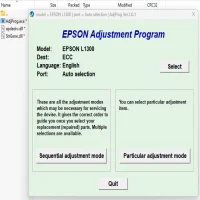
Launch the Program: After the installation is complete, open the Epson Adjustment Program. It will likely ask you to select the printer model and may require administrative privileges to run.
-
Select the Adjustment Function: The software will present a list of available adjustment functions, such as head cleaning, ink reset, or error code clearing. Select the function that best addresses the issue you’re encountering.
-
Follow the Instructions: Each adjustment function comes with specific instructions. Carefully follow these instructions, as some actions, such as ink charging or resetting the waste ink counter, may take several minutes to complete.
-
Test the Printer: After making the necessary adjustments, perform a test print to ensure the issue has been resolved. If the problem persists, repeat the adjustment program or try another function.
Precautions When Using the Adjustment Program
While the Epson Expression ME-301 Adjustment Program can be highly effective in restoring your printer to working condition, there are a few things you should be cautious about:
-
Backup Your Data: Before using the program, it’s a good idea to backup any important printer settings or configurations. Although the program is designed to be safe, resetting certain functions may change preferences or settings.
-
Be Cautious of Third-Party Sources: Since the official Epson website does not distribute the adjustment program, ensure you are downloading from a trusted third-party website. Avoid downloading files from unverified sources, as they may contain harmful malware.
-
Follow Instructions Carefully: The adjustment program offers powerful features that can fix a variety of printer issues, but improper use can lead to further problems. Always follow the on-screen instructions carefully to avoid mistakes.
-
Ink Usage: Some functions, such as deep cleaning, can consume ink quickly. Be aware of your ink levels before running these functions to avoid running out of ink mid-process.
Conclusion
The Epson Expression ME-301 Adjustment Program is a powerful tool for maintaining and troubleshooting your Epson inkjet printer. Whether you’re dealing with clogged print heads, ink counter resets, or error messages, the program can help restore functionality and improve the quality of your prints. By understanding how the program works and using it carefully, you can extend the lifespan of your Epson ME-301 and ensure that it continues to deliver high-quality results for years to come.
Remember to always download the software from a reliable source and follow the instructions precisely to avoid complications. With the Epson Adjustment Program, you'll have the tools you need to keep your printer running smoothly.
Rate the App
User Reviews
Popular Apps